
Loan Against Policy
An app that helps you generate a loan against your existing HDFC Life policies
UX Case Study
HDFC Life Project
Product Overview
The Loan-against-policy app represents a significant milestone in our journey towards empowering individuals to unlock the full potential of their insurance assets.
This project, undertaken at HDFC Life, aims to streamline the loan process, ensuring convenience and efficiency for users while maximizing the value of their insurance policies.
Expected Impact
Enhanced brand reputation and customer loyalty through a seamless and transparent lending experience.
Expanded market reach and revenue growth opportunities by catering to the evolving needs of policyholders seeking financial flexibility.
Increased user engagement and retention rates due to improved usability and satisfaction levels.
Project duration
12th November - 10th February
(12 weeks)
Problem Statement
Create an intuitive UI/UX to boost awareness of loan procedures and policy selection, enhancing user understanding and engagement.
Business goal
Enhance awareness and comprehension across all user touchpoints, minimizing dependency on branch and call center support through a self-directed user experience journey and to decrease surrender value.
Design Process
Understand
User Research
User Interview
Competitve Analysis
Define
User Personas
Empathy Map
User Journey
Ideate
User Flow
Information Architecture
Design
Wireframe
Hi-Fi Designs
Prototype
Test
Feedbacks
Conclusion
Future Concept
Target audience
The design targets current HDFC Life policyholders seeking to obtain a loan against their respective policies.
Traget age group : 30-60 years old
Competitive Analysis
The subsequent findings emerge from the assessment of various loan websites, examining them against UX criteria.
User persona
Websites
Strengths
Weakness
Design principles
FreeCharge
by Axis
Simple and easy to navigate UI.
Minimal design.
Too much information on the page.
Lacks interactive elements
Consistency
Simplicity
Visual heirarchy
Credy
Easy to navigate.
Clear display of all Information.
CTA not upfront.
Lacks interactive elements & visuals.
Clarity in Information
Good navigation
Cognitive load
Tata Capital
Consistent design & good navigation
Good use of colours and CTA.
Complex navigation.
Limited interaction.
Consistency
Simplicity
Visual heirarchy
Money View
Simple design & good hierarchy of elements.
Highly interactive.
Too much information
Good usability & navigation.
Simplicity
Reduced cognitive load.
About
Rahul is a salaried individual who is a policy holder of HDFC Life. He is getting married in a few months and hence looking forward to buy a house. He is trying to arrange for funds for the same.
“I want to buy myself a dream house, without much hassle of loan”
Gender
Male
Occupation
Salaried
Age
30
Maritial status
Single
Frustrations
Limited options for loan providers
Confusing loan application process
High interest rates
Difficulty in comparing loan options
Lengthy approval process
Needs
Low interest rates
Easy and user-friendly loan application process
Quick approval process
Clear eligibility criteria
Assurance of no hidden fees and charges
Goal
Find a loan provider with the lowest interest rate
Complete the loan application process smoothly
Get approved for a loan quickly
Receive personalized loan recommendations

Rahul Jain
Empathy map
Acquiring a loan from HDFC Life is notably simpler.
No credit checks are necessary for existing policyholders.
The process entails minimal procedural complexities.
Existing policyholders benefit from streamlined procedures.
Loan platforms can often be
un-trustworthy
Maybe the loan disbursement process takes too long
Extremely long processing periods
Don’t want to go through extremely long document uploading process
I need a loan to buy a new house before my marriage.
I need a loan package with low interest rates
I need a platform that is trustworthy and will instantly disburse money
I need a quick approval process
Explores different platforms with low interest rates and instant disbursement.
Gather necessary documents for loan application.
Compares various interest rates.
Compares the terms and conditions of different platforms.
Says
Think
Does
Feels
Information architecture/ User flow
Information architecture plays an important role in defining the structure, organization and presentation of information within a digital product.
User authentication (OTP)
Start
END
Existing policy selection
Select the loan details
CKYC process
Fill PAN details
Confirm Basic details
Fill new address
Confirm Bank details
Enach Process
If Name mismatch
Bank no. mismatch
Congratulations page
Yes
No
EKYC process
Choose a different process
EKYC verification
Manual process
Penny drop
successful?
Change address details?
Are user’s PAN details fetched?
Verification Successful?
PAN authentication successful?
CKYC/
EKYC/Manual
process
failed
Yes
Yes
Yes
No
Upload documents
Are user’s PAN details fetched?
No
Yes
No
No
Yes
new bank details
Change
bank
details?
No
Yes
Input correct name
Input new bank no.
Wireframe
Wireframe is a low-fidelity visual representation of a digital product which outlines the basic structure and layout of the interface without including detailed design elements such as colors, fonts, or images. The main focus is on the arrangement of elements, functionality, and navigation.
Style guide
A style guide in UI design serves as a comprehensive reference for the visual and stylistic standards of a digital product, outlining specifications for design elements.

Font :
3B82F6
ED1C24
1B1B1B
6D89C2
D9D6FF
F6F5FF
Blue
Red
Purple
Lilac
Black
Indigo
Home page
Loan Against Policy app screens
1
Amount selection
2


Home screen
Policy selection
Loan preferences
Select one option to proceed
Loan amount confirmation
Authentication page for log in
Existing policy holder Of HDFC life authenticates himself via OTP on the first page.
The user chooses a policy from their existing ones and proceeds to take out a loan against it, selecting the loan amount, tenure, and a fixed interest rate.
FAQ


Basic details page
OTP for verification
Change address Pop up
Bank details page
Change bank details
Basic details
3
If the user decides to proceed with PAN, once their details are retrieved from the backend API, they must first verify their basic information.
Bank details
4
After confirming the basic details, user must verify his bank details.


E-Nach page
Enter PAN details
If PAN isnt avaiable
Name mismatch screen
Bank number mismatch screen
Loan successfully granted
PAN not fetched
6
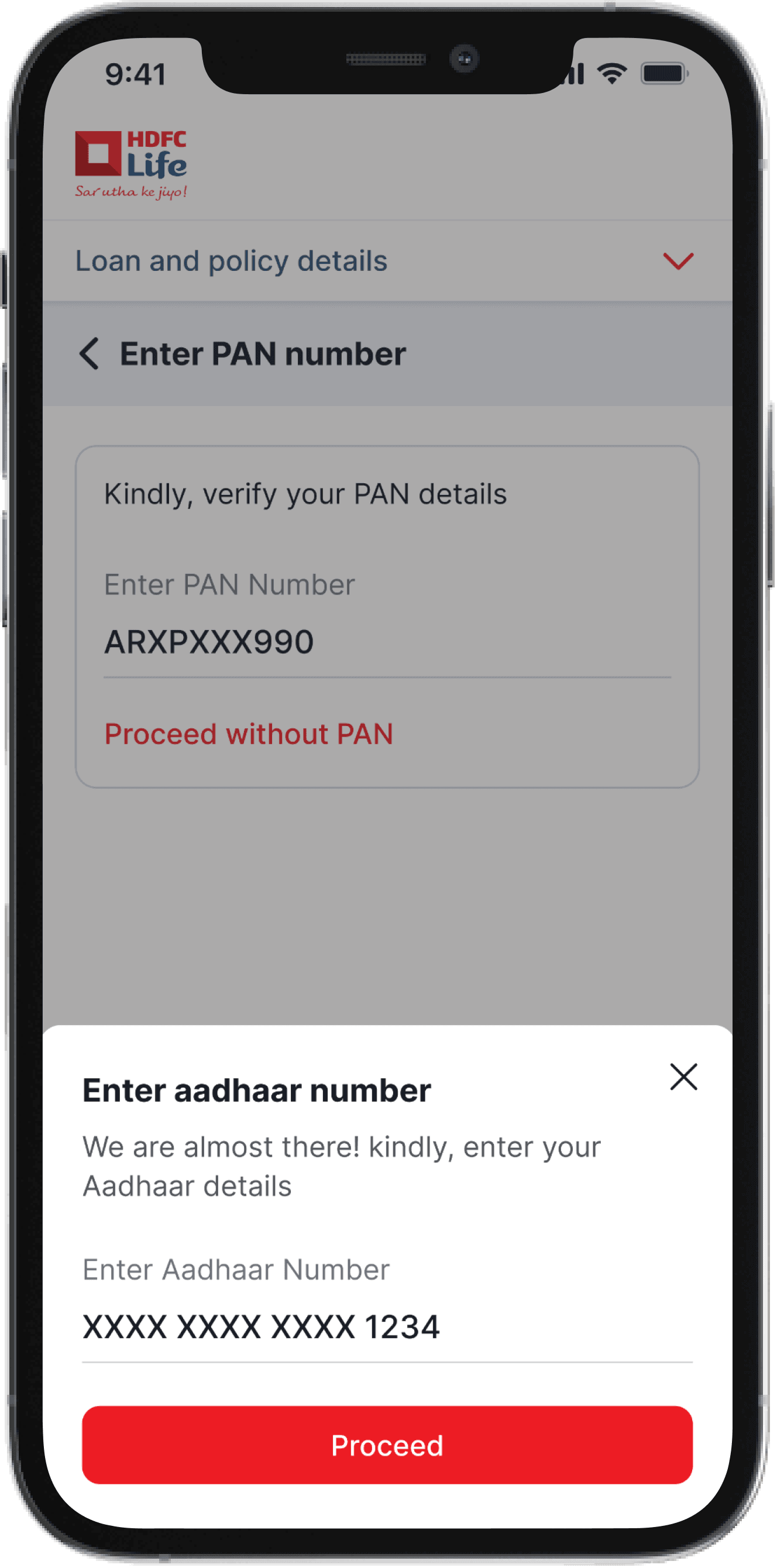
If the PAN retrieval fails, you manually enter your PAN. If you don't have a PAN card, you provide your Aadhar details instead."
Penny drop fail
7
If the penny drop fails, it may be due to two reasons: a mismatch in names or a mismatch in bank numbers.
Bank details
5
After confirming the bank details, the user moves on to ENach, initiating the penny drop process to verify the legitimacy and activity of the bank account. Upon successful penny drop, the congratulations page is displayed




Failed authentication page
PAN process failed
8
If this procedure is unsuccessful, the user moves forward with either of the other two processes: Aadhar or manual.
The same journey with EKYC verification
The same journey with manual document upload

Thank You for Watching